Sign in

username or email:

password:


Not a member?
Forgot your Password?

Search blogs


Search tips

Articles by category

Our Bloggers

See Also

DSPFPGA
Kunal Singh
Kunal holds a master's degree in Micro-Electronics from BITS, Pilani (India). He has been working on Application Programming, DSP Programming, Systems Programming and Hardware Design for the last seven years. His areas of work include Design, Development and Debugging of Embedded Multimedia Systems. | Personal Website

RSS Feed | Pageviews: 312

Would you like to be notified by email when Kunal Singh publishes a new blog?


Hello Android

Posted by Kunal Singh on May 5 2008 under Tools | Technology | Software Development | Products   

Android Application

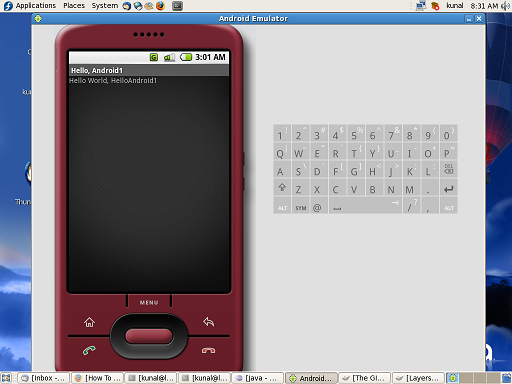
Finally I could get Android Early SDK up and running on my Fedora Core-7 Machine.

The process was quite simple. However I had to struggle for a few days, because Fedora install the gnu version of Java and Android requires Java from Sun.

Here are the steps I had to follow:

(1) Install the eclipse IDE (if you do not have it already) with following command:

$> yum install eclipse-jdt eclipse-jdt-sdk (to be done as super user).

(2) now install the Android SDK and ADT plug-in for Eclipse using instructions from this link.

(3) Install the Java from Sun and set it as default by following instructions from this link.

(4) Now you can say Hello to Android as described in this tutorial.



Rate this article:
2
Rating: 2 | Votes: 1


posted by Kunal Singh
Kunal holds a master's degree in Micro-Electronics from BITS, Pilani (India). He has been working on Application Programming, DSP Programming, Systems Programming and Hardware Design for the last seven years. His areas of work include Design, Development and Debugging of Embedded Multimedia Systems. | Personal Website

Previous post by Kunal Singh: NXP acquires Conexant STB Division
Next post by Kunal Singh: Building Linux Kernel for Desktops
all articles by Kunal Singh


Comments


grass
Said:
With the popularity of android-phone, more and more apps are introduced into android-phones.Here I wanna recommend you a very useful and popular app which is QR Code reader.QR code reader becomes necessary for our mobile phones and barcode reader can be helpful for our daily life to scan information.I've using OnBarcode barcode reader for android, it's really cool! http://onbarcode.com/products/android_barcode/
1 year ago
0
Reply
Sorry, you need javascript enabled to post any comments.