Good old multiplexed keypad in an embedded system
Good old multiplexed keypad in embedded systems
(My www.embeddedrelated.com Blog No.1)
Touch-screens, rotary encoder switches and other navigational aids rule the user interface these days. Navigation through menus and sub-menus is child’s play as icons and thumbnails rule the screen.
Jumping from one screen to another, switching between programs and event notification pop-ups are made possible due to high speed processors and break-through in memory technologies. Matrix-like switching between menus is trend of the day due to Multi-tasking operating systems.
When it comes to the regular, mid-budget, day-to-day embedded project, the designer cannot ignore the common method of using multiplexed keypads for most designs. This is due to the fact that the end users and applications demand the presence of hard-wired keys due to various factors such as conventional requirements, harsh environments, rough usage, etc.
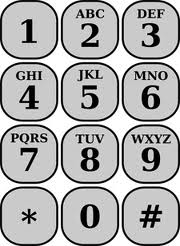
Key-scanning is a vital part of any design. Although the associated algorithms are available for reference through books and web resources, it pays rich dividends if proper care is taken. There is not a single perfect method and each different method available is aptly suited to the design for which it is tailored.
A few important considerations would make your key scanning and decoding strategy very professional and easily portable across various designs while maintaining user experience as the paramount factor.
Let us list out the benefits provided by or expected from such an algorithm.
- Least Execution Time – which makes the key scanning process invisible to the user.
- Execution from a timer interrupt – which enables periodic, repeated scanning so as not to miss any key press.
- Portability – Code must be processor independent and hardware-specific code must be grouped separately. Then, all that remains is to change this code only to port to a different design or another microcontroller.
Let us limit ourselves to the above three important factors, even though there are myriad of other benefits.
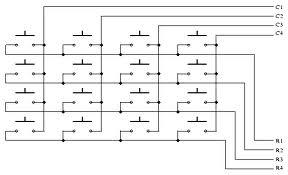
Common method of key decoding is done mostly through a single function which is responsible for scanning the keys, decoding the pressed key and returning a value corresponding to the key.
This consumes significant amount of time which defeats the very purpose of multi-tasking thereby reducing the throughput of the system. To compensate for this, the designer does certain trade-offs, which , in the longer run, can affect the field application of the end product.
How can you overcome this necessary, yet inconvenient situation?
Break the code - Redesign your key detection code into usable independent modules.
The GlanceKey Function
Your most important module will be to have a function which glances the keys, every now and then. Its primary goal is to only monitor if any key is pressed and NOT any particular key.
The Decode Function
You will have another module which decodes and detects which key is pressed. This function will be called only when your GlanceKey detects any key press. Otherwise, this function is skipped.
StateMachineFunction
This is a vital module which breaks the whole key scanning process into different key states.
What is a key state? It is simple and self-explanatory.
Depending on whether a key is pressed are not, the key can be at different states such as Key Not Pressed, Key Pressed, Key Debounce, Continuous Key Press, Key Released, etc.,.
When you make a function which is a state machine where each key state is part of a “switch – case” code, you can put in the appropriate yet very small code under each of the “case” statements. This means, when your microcontroller calls this function, it only executes very less code each time.
Void StateMachineFunction(void)
{
Switch(KeyState)
{
Case KEY_OPEN:
……….
Break;
Case KEY_CLOSE:
……….
Break;
Case KEY-DEBOUNCE:
……….
Break;
….
….
}
}
These modules or functions must take very less execution time, and hence can be called from a timer interrupt.
Portability is not limited to key scanning alone and can be done in several standard ways.
Being a time-tested input aid , keypad would still be around for a long time. Once a designer understands the nuances of keyscan algorithms, the same can be applied to nearly any other interface technology.






- Comments
- Write a Comment Select to add a comment

To post reply to a comment, click on the 'reply' button attached to each comment. To post a new comment (not a reply to a comment) check out the 'Write a Comment' tab at the top of the comments.
Please login (on the right) if you already have an account on this platform.
Otherwise, please use this form to register (free) an join one of the largest online community for Electrical/Embedded/DSP/FPGA/ML engineers: