MSP430 Launchpad Tutorial - Part 1 - Basics
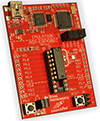
TI's LaunchPad is a complete MSP430 development environment: all you have to do is download and install CCS IDE (login required), connect your G2231-ready LaunchPad to your computer with the included mini-usb cable, and you are ready to...

Summary
This tutorial walks through getting started with the TI MSP430 LaunchPad (G2231) using Code Composer Studio, covering board setup, toolchain installation, building and flashing a first program, and basic debugging. Readers will learn how to write simple bare-metal firmware, exercise GPIO and timers, and explore low-power features of the MSP430.
Key Takeaways
- Install and configure Code Composer Studio (CCS) and connect the MSP430 LaunchPad for development and debugging
- Build, flash, and run a first bare-metal firmware example (LED blink) using GPIO and timer peripherals
- Use the on-board emulator to set breakpoints, single-step code, and inspect memory/registers for debugging
- Apply basic low-power modes and watchdog timer settings to reduce MSP430 power consumption
Who Should Read This
Beginner embedded engineers, hobbyists, or students who want a hands-on introduction to MSP430 development and bare-metal firmware workflows.
Still RelevantBeginner
Related Documents
- Consistent Overhead Byte Stuffing TimelessIntermediate
- PID Without a PhD TimelessIntermediate
- Introduction to Embedded Systems - A Cyber-Physical Systems Approach Still RelevantIntermediate
- Can an RTOS be really real-time? TimelessAdvanced
- Memory Mapped I/O in C TimelessIntermediate